What is the Generative AI report in Google Search Console?
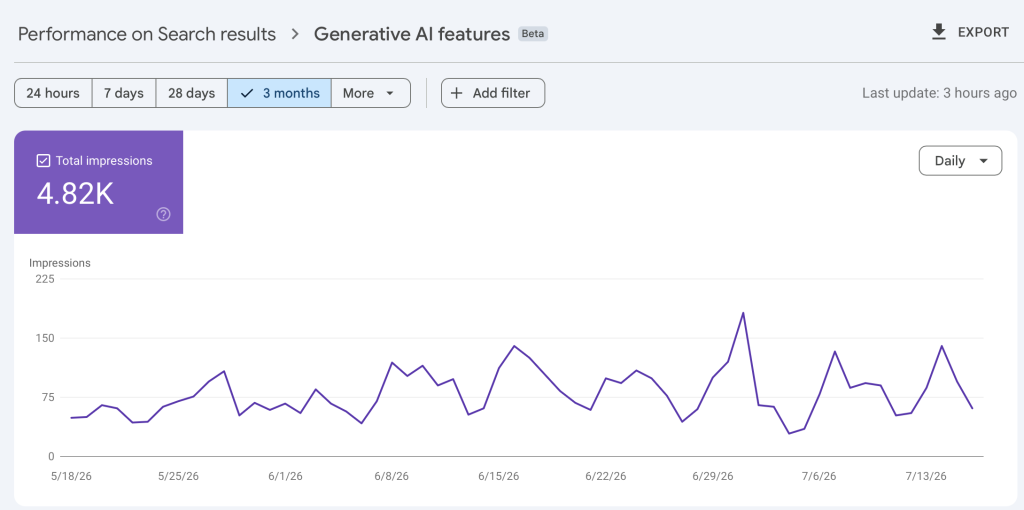
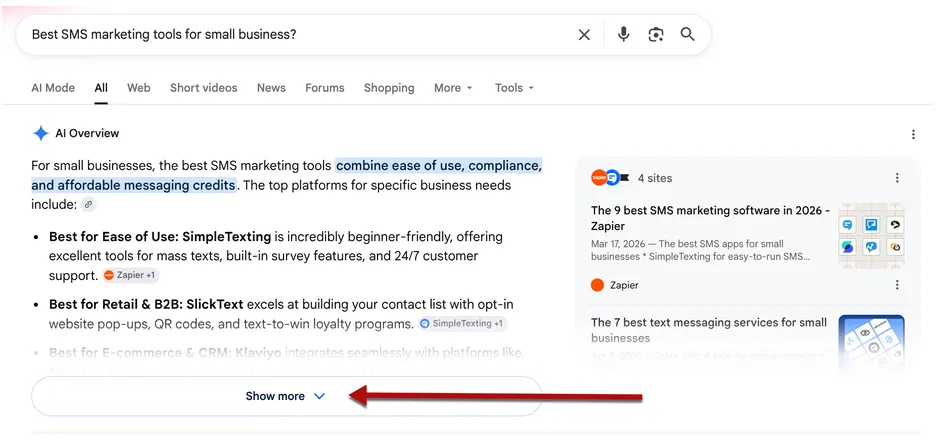
The Generative AI report in Google Search Console is a performance report dedicated to Google’s generative search experiences, AI Overviews and AI Mode.
It measures the impressions your site earns inside those AI surfaces, separately from classic search results. Since its launch on June 3, 2026, it exists in two versions: one for Search, one for Discover.
What does the Generative AI report cover?
| Element | Status |
|---|---|
| Surfaces included | AI Overviews and AI Mode (Search) |
| Metric available | Impressions only |
| Dimensions | Pages, Countries, Devices, Dates |
| Clicks, CTR, position | Not available |
| Queries | Not available |
| AI Overviews / AI Mode split | Not available |
| Search Labs | Excluded |
| Discover | Separate report |
| Rollout | Subset of properties, UK first |
How are impressions counted in the Generative AI report?
Google’s documentation states that the Generative AI report contains data from the Web search type of the Performance report.
This is not additional volume. It is an isolated subset. Your aggregate totals do not change, Google simply created a dedicated view.
The ratio AI impressions / Web impressions is therefore a share of visibility, not a ratio between two independent universes. That is what makes the calculation legitimate.
Standard impression rules apply: a link has to be scrolled or expanded into view to count. John Mueller confirmed this on Bluesky in June 2026. A link the user has to activate only counts from the moment it is activated. Your real presence in AI answers is therefore structurally underestimated by the report.
Precautions to know before analyzing your Generative AI report
Property vs page aggregation
The chart total is aggregated by property: two results from the same site inside one AI answer count as a single impression. The table grouped by page is aggregated by page. The sum of your URLs can therefore exceed the chart total. Per-URL ratios remain comparable because both sides are aggregated by page.
Canonicalization
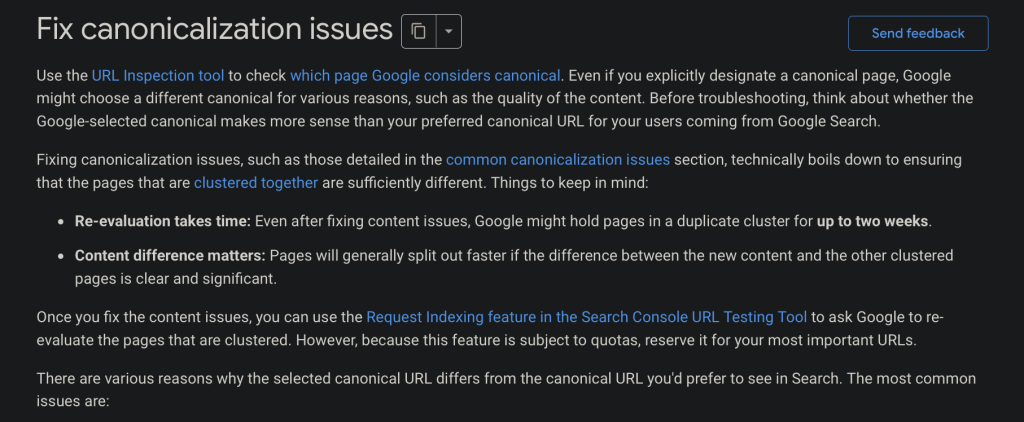
The report assigns data to the canonical URL selected by Google, not to the duplicate URL. On a multilingual site, a hreflang or canonical conflict can push the impressions of one language version onto another.
I already covered the importance of a clean canonical implementation in my Google Search Central Live Paris 2026 recap. Google has since published an update to its canonicalization documentation, with two goals: restate the best practices that help Google identify the canonical URL, and reassure SEO teams about the delay before canonicalization changes are processed by Google’s systems.
This matters more than it looks for this report. If Google has selected your English version as the canonical of a language cluster, the AI impressions of the French version are consolidated onto the English URL, and any language comparison you run is measuring your hreflang setup, not your content.
How to analyze the Generative AI report in Google Search Console
Before interpreting any number, apply the same method to every period you analyze.
Step 1: pick a date range available in both reports
The Generative AI report often has less history than the Performance report. Several practitioners report a backfill that starts later than the classic data. Compare only the dates available in both interfaces, and apply the same filters on both sides: country, device, directory or page type.
Why this step matters: if your generative report covers 60 days and your Web report covers 90, your AI visibility share is mechanically understated by a third. This is the single most common error on this analysis.
Step 2: pull the Generative AI data
Record total impressions, the number of visible URLs, and the pages that concentrate the most impressions. Export the Pages table so you can work URL by URL.
Step 3: pull the same data from the Performance report, Web search type
This report is your comparison base. Be careful: AI impressions are already included in it. The Generative AI report does not add new volume, it isolates part of your Web visibility.
Set the search type filter explicitly to Web. Comparing the generative report against an unfiltered Performance total that includes Discover or News will inflate your denominator and understate your AI share.
Step 4: calculate your AI visibility share
The formula:
AI visibility share = generative AI impressions / total Web impressions × 100
Run this at site level first, then per URL, but only on URLs with enough volume. Avoid drawing conclusions from pages generating a few dozen impressions. A reasonable floor is 500 Web impressions over the period.
Step 5: measure coverage and concentration
Compare the number of visible URLs in each report, then the share of impressions captured by your top 3, 5 and 10 pages.
- Coverage = URLs in the AI report / URLs in the Web report
- Concentration = impressions of the top N URLs / total impressions, calculated separately for each report
You will then know whether Google cites your site broadly or leans on a small group of pages.
Step 6: identify the pages that keep coming back
Look at the formats, topics and intents of the URLs that are most visible in generative answers: how-to guides, definitions, comparisons, product pages, news content. This is usually more useful than tracking a global average.
Step 7: segment by country before concluding anything about language
If your site is multilingual, split both reports by country before comparing language versions. AI Overviews and AI Mode are not available everywhere. France, for example, is still waiting for the rollout at the time of writing. A page whose impressions come mainly from a market where the surface does not exist cannot generate AI impressions, and that has nothing to do with its content.
Step 8: check the Google-selected canonical on your language pairs
Use the URL Inspection tool on both versions and read the “Google-selected canonical” field. If Google picked one version as the canonical of the cluster, the comparison between versions is meaningless.
Comparing AI visibility with classic visibility
The right comparison is not simply two impression totals side by side. It has to answer four questions: what share of your Web visibility comes from AI surfaces, how many pages appear there, which pages concentrate that visibility, and which content types are absent or overrepresented.
Start by comparing the following indicators over a strictly identical period and filter set:
- AI visibility share: generative AI impressions / total Web impressions.
- Coverage: number of URLs visible in the AI report / number of URLs visible in the Web report.
- Concentration: share of impressions captured by the top 3, 5 or 10 URLs in each report.
- Overlap: which pages are visible in both reports, which are visible in the Web report only, and which are disproportionately present in the AI report.
- Content families: compare guides, comparisons, editorial pages, brand pages, news and transactional pages against each other.
How to read the results
| What you observe | What it means | What to do |
|---|---|---|
| Low AI share, concentrated on a few pages | Dependency risk. Those pages carry your entire generative presence | Study what they have in common, replicate the pattern, monitor them weekly |
| High URL coverage, low concentration | Google mobilizes many pages from your site in AI answers | Healthy portfolio, focus on depth rather than breadth |
| Pages strong in the Web report, absent from the AI report | Not necessarily a problem. Those intents may not trigger a generative answer | Check the intent before optimizing. Navigational, very fresh or click-oriented queries rarely trigger AI answers |
| A page that appears only in the AI report top 10 | High impressions, near-zero CTR. Classic zero-click pattern | Priority candidate for GEO structuring work |
| AI share collapsing on one URL week over week | Either a canonical change, a content update, or the page lost its citation slot | Check the Google-selected canonical first, then the content diff |
What you cannot conclude. Do not read AI visibility as a driver or a killer of clicks. The report gives no clicks, no CTR and no query data. It measures presence, not yet its business return. Anyone telling you they have measured the click impact of AI Overviews from this report alone is extrapolating.
My AI visibility vs classic visibility on aioseo.fr
| KPI | Classic report (Web) | Generative AI report |
|---|---|---|
| Impressions | 66,200 | 4,820 |
| Clicks | 763 | Not available |
| Average CTR | 1.2% | Not available |
| Average position | 10.9 | Not available |
| Distinct URLs | 126 | 40 |
| Top 10 concentration | 50.8% of impressions | 94.7% of impressions |
Three readings from that table:
- AI impressions represent 7.3% of total impressions (4,820 against 66,200).
- Generative visibility is far more selective than organic visibility. Only 31.7% of the URLs visible in classic search appear in the AI report (40 out of 126).
- Strong concentration. The top 10 URLs capture 94.7% of AI impressions, against 50.8% in the classic report.
Google does not cite the site uniformly. It leans on a very limited number of pages. The analysis should therefore focus on those contents first, to identify the characteristics that drive their selection in generative answers.
Finding 1: AI visibility is twice as concentrated as classic visibility
The top 10 accounts for 50.8% of classic impressions but 94.7% of AI impressions.
In other words, the long tail exists in the classic SERP and does not exist in generative surfaces. 86 URLs generate half of the classic impression volume. In the AI report, 30 URLs out of 40 account for 5% of the volume.
An AI visibility portfolio resting on three pages is a fragility. If one of them drops, your AI share of voice collapses without the classic Performance report moving visibly, because the associated clicks were already close to zero.
The risk is invisible in current dashboards. This is exactly the kind of blind spot Glenn Gabe has been documenting for two years on traffic drops linked to generative surfaces.
Action: define an AI concentration indicator (share of the top 3 URLs in the AI total) and track it the same way you track dependency on a single query.
Finding 2: classic CTR predicts AI share, but not always
I will spare you the full ranking of my URLs by CTR, but an interesting correlation appeared, though not a conclusive one: inside a generative answer, the synthesis absorbs the click, the impression is still counted on the classic SERP side, and CTR collapses.
Aleyda Solis has been arguing since 2025 for decoupling visibility KPIs from traffic KPIs, for exactly this reason.
Action: filter your Performance report on pages with more than 1,000 impressions and less than 1% CTR. That is your priority list for GEO work, and for SEO work too. Those are the pages Google already shows, and where structuring effort has the best marginal return.
Finding 3: editorial format sorts the pages
Formats favored by AI surfaces, unsurprisingly:
- comparisons (“vs”, “what are the differences”),
- definitional content (“what is”, “how LLMs rank answers”),
- practical guides (“checklist”, “top 10 tools”, “how to exploit”).
Formats rarely picked up:
- Homepage: 0.42% AI share on 2,368 classic impressions. A navigation page answers no closed question.
- Event content: my Search Central Paris page performs well on the classic SERP, at least for now, and does not appear anywhere in the URLs of the generative report. Neither does its English twin.
This is not underperformance. Generative answers do not appear for every search.
If someone is looking for a specific site or for very recent information, Google has little reason to display an AI synthesis. In those cases the classic results already answer the need perfectly. Absence from AI visibility is often normal.
Action: stop optimizing event content for AI citation. Treat it as an immediate-click format, with title and description written for CTR, and concentrate the GEO effort on definitional and comparative formats. Chris Long and Mark Williams-Cook argue for the same segmentation by intent rather than by page type.
Do AI Overviews favor English content?
Yes, to some extent. Like most large language models, AI Overviews still seem to carry a slight advantage for English-language content.
In my own data, a French page generates only 0.60% of its impressions through AI surfaces, while its English version, structurally equivalent, reaches 12.19%. That is a 20.4x gap.
On its own, this example proves nothing. My sample is limited to 126 URLs and is not enough to demonstrate a bias on Google’s side.
That said, the observation is consistent with what research has shown for years about LLMs. Models are trained on volumes of English content far larger than in other languages. They have better knowledge coverage in English and generally perform better in that language. The phenomenon is documented in several academic papers, notably in the ACL Anthology, where researchers show that LLM performance remains uneven across languages, with English keeping an advantage on many tasks.

But two counterweights matter here.
First, two other FR/EN page pairs on my site show almost identical AI visibility share, 11.56% for the French version against 10.91% for the English one on an identical topic. Language is one factor among several, not a universal explanation.
Second, there is a confounding variable that anyone running this analysis outside the United States needs to control for: surface availability by market. AI Overviews and AI Mode are not yet deployed in France. The rollout was revealed by Ouest-France on June 29, 2026, based on an official letter sent to French press publishers, then confirmed by Le Monde and Les Échos, with a deadline of September 23, 2026. France is the last major market without the feature, for neighboring rights reasons rather than technical ones.
A French page whose classic impressions come mainly from France cannot generate AI impressions. Its English twin, ranking in markets where the surface has been live for two years, accumulates over the full window.
Practical takeaway if you run a multilingual site: never compare language versions on raw totals. Segment by country first, check the Google-selected canonical second, and only then look at content structure. Otherwise you will publish a language finding that is really a geography finding or a hreflang bug.
What are the limits of the Generative AI report?
| Limit | Impact | Workaround |
|---|---|---|
| No click or CTR data | ROI calculation impossible | Cross-reference manually with the classic report, URL by URL |
| No query data | No intent analysis | Use Bing Webmaster Tools grounding queries as a proxy |
| No AI Overviews / AI Mode split | Impossible to know which surface drives which page | None for now |
| Impressions conditional on expansion | Real visibility underestimated | Third-party GEO tools for citation measurement |
| 1,000-row limit, Pacific Time zone | Large sites truncated | Directory filters, segmented exports |
| No documented API or BigQuery access to date | No native automation | Scheduled CSV export, recheck periodically |
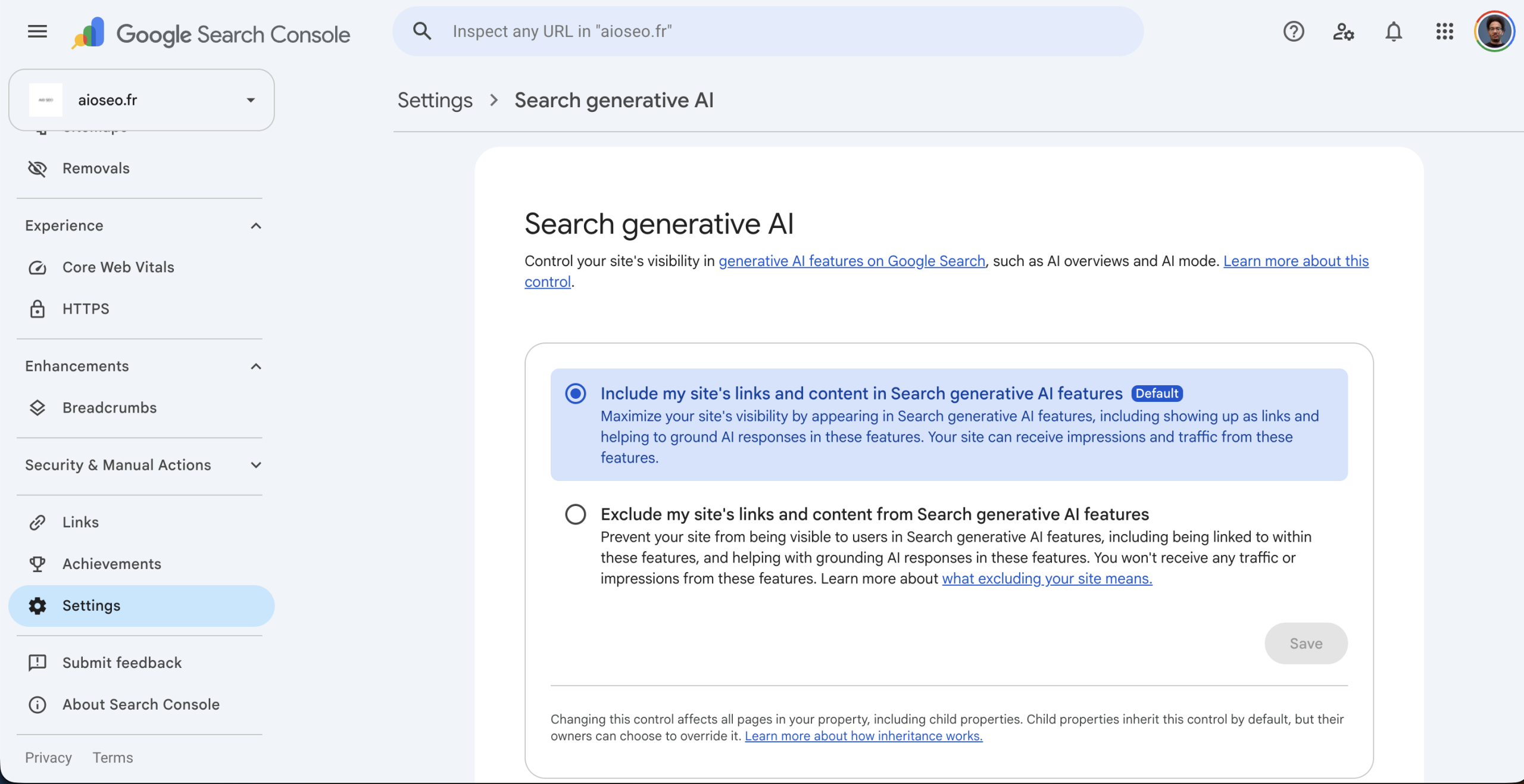
| Possible exclusion via the Search toggle | Empty report without any SEO problem | Check the inclusion setting for AI features |
Google is rolling out a control to include or exclude a site from AI features
Google introduced, alongside the report, a control to include or exclude a site from generative AI features.
An excluded site receives neither traffic nor impressions from those surfaces, but Google states that this setting is not used as a ranking signal for classic search results. If your report is empty, check this parameter before concluding you have a content problem.
How to allow or block your site in AI Overviews and AI Mode
Since June 2026, Google offers a dedicated control in Search Console to manage a site’s presence in Google Search generative AI features.
To access it:
- Search Console → Settings → Search generative AI control.
- Choose “Include my site’s links and content” to allow your site to appear in AI Overviews, AI Mode and Discover AI features. This is enabled by default.
- Choose “Exclude my site’s links and content” to prevent Google from using your content in those features.
- If your property depends on a parent property, you can also inherit its setting.
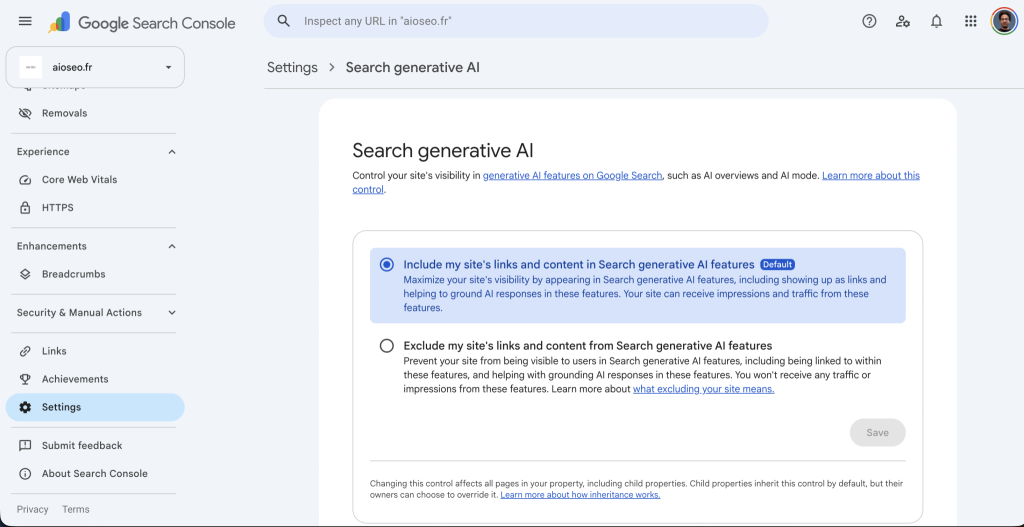
Action: open your site to Google’s generative surfaces, AI Overviews and AI Mode.
Note: this setting is independent from Google-Extended. The Search Console control governs the presence of your content in Google Search generative AI features, while Google-Extended governs the use of your content to train certain Google AI models.
Google Search Console vs Bing Webmaster Tools: AI reporting compared
| Criterion | Search Console (Generative AI) | Bing Webmaster Tools (AI Performance) |
|---|---|---|
| Launch | June 3, 2026 | February 9 to 11, 2026 |
| Main metric | Impressions | Citations |
| Queries | None | Grounding queries, sampled |
| Intents and topics | No | Yes, since June 16, 2026 |
| Citation share | No | Citation Share, since June 2026 |
| Period comparison | Through the Performance interface | Compare, native |
| Clicks | No | No |
| Surfaces | AI Overviews, AI Mode | Copilot, Bing AI summaries, partners |
| Surface isolation | No | No |
| Addressable volume | Very high | Low in Europe |
Verdict: Microsoft is eight months ahead on analytical depth. Google has the volume, Bing has the instrumentation. Neither gives you the click. The rational strategy is to verify both properties and use Bing as an intent laboratory, Google as a volume measurement.
How to get the clicks the report does not give you
The report does not provide clicks. Three complements, in order of reliability:
GA4, AI Assistant channel. On May 13, 2026, Google added a default “AI Assistant” channel that automatically classifies sessions referred by ChatGPT, Gemini, Claude, Copilot and others, with the medium ai-assistant.
Three caveats: it is not retroactive, it does not cover every platform, and above all clicks from AI Overviews and AI Mode stay in Organic Search. This channel does not solve the problem posed by the Search Console report. It handles third-party LLMs, not Google’s own surfaces.
Server logs. The only source that captures traffic without a referrer. A significant share of AI-originated visits arrives with no referrer header and lands in Direct in GA4. Logs are the only reliable floor measurement.
Third-party GEO tools. For prompt-by-prompt citation measurement, outside Google’s scope. Take a look at my top 10 GEO tools and my GEO tool comparisons.
What will change in the next 12 months
The French rollout of AI Overviews and AI Mode. They arrive in France by September 23, 2026. Every French site will see its generative report go from empty to populated within weeks. Anyone who has not established a baseline before that will not be able to measure the impact. The window is closing.
For readers outside France, this is worth watching for a different reason: it is the closest thing the industry will get to a natural experiment on the impact of generative surfaces in a mature search market, with a clean before and after.
Enrichment of the report. Google iterates fast on this. The likely scenario, by analogy with the News and Discover reports, is the progressive addition of clicks, then per-surface granularity. The AI Overviews vs AI Mode split is the data point the industry asks for most.
The KPI shift. AI share will become a steering indicator alongside average position. Organizations that keep steering on organic traffic alone will miss half the signal, because the very mechanism of generative surfaces decouples visibility from clicks.
FAQ
Does the Generative AI report replace the classic Performance report? No. It isolates a subset of data already present in the Web search type of the Performance report. Aggregate totals do not change. It exposes a single metric, impressions, with no clicks, CTR or position.
Does a page that performs in the classic SERP automatically perform in AI surfaces? No. On the data observed, 60% of URLs overlap between the two top 10 lists. Pages with high CTR and navigational or event intent are almost absent from the generative report, while pages with very low CTR and high impression volume dominate it.
Does content language influence visibility in AI answers? Partly, but the effect is easy to overstate. Two FR/EN pairs on my site show near parity, 11.56% for the French version against 10.91% for the English one on an identical topic. A third pair shows a 20x gap. Before concluding anything about language, segment by country and check the Google-selected canonical, because market availability and canonicalization both produce the same symptom.
Why is my Generative AI report empty? Four possible causes: your property is not in the rollout scope yet, impression volume is insufficient, the site has been excluded from AI features through the dedicated control, or the surfaces are not available in your site’s main market, which is the case for France until summer 2026.
How do I calculate my AI visibility share? Generative report impressions divided by Performance report impressions on the Web search type, per URL, over a strictly identical time window. Check that the generative report does not start later than the classic report, otherwise you will understate the ratio.
Does the report separate AI Overviews from AI Mode? No. Both surfaces are aggregated into a single impressions metric. Discover has its own separate report.
Can I access this data through the API or BigQuery? No Google documentation to date mentions access to the generative report through the Search Analytics API or the BigQuery bulk export. Only the CSV export from the interface is documented.
How often should I check this report? Weekly is enough. Track four numbers: total AI impressions, number of visible URLs, AI visibility share, and top 3 concentration. Alert on a drop above 30% on any top 10 URL, and on any new URL crossing 100 AI impressions.
A serious GEO agency should know how to read this report. To pick one, I made a ranking of GEO agencies in France with 5 questions to ask them.
Keep reading
- Top 10 best GEO agencies in France (October 2026)
- Gemini 4 Argon in Google AI Mode: what it changes for SEO and GEO
- Search Console Multimodal Filter: What It Measures (Lens, Circle to Search)
- Search Central Live Deep Dive Barcelona 2026: what Google said over the 3 days
- AI Overviews and AI Mode landed in France on July 22, 2026, two months before the Promised deadline
To track this visibility over time, compare GEO tools: the top 10, free and paid, or choose with the decision guide.
Another AI Mode topic right now: Gemini 4 Argon in AI Mode, DEJAN study and test protocol.
Leave a Reply
You must be logged in to post a comment.