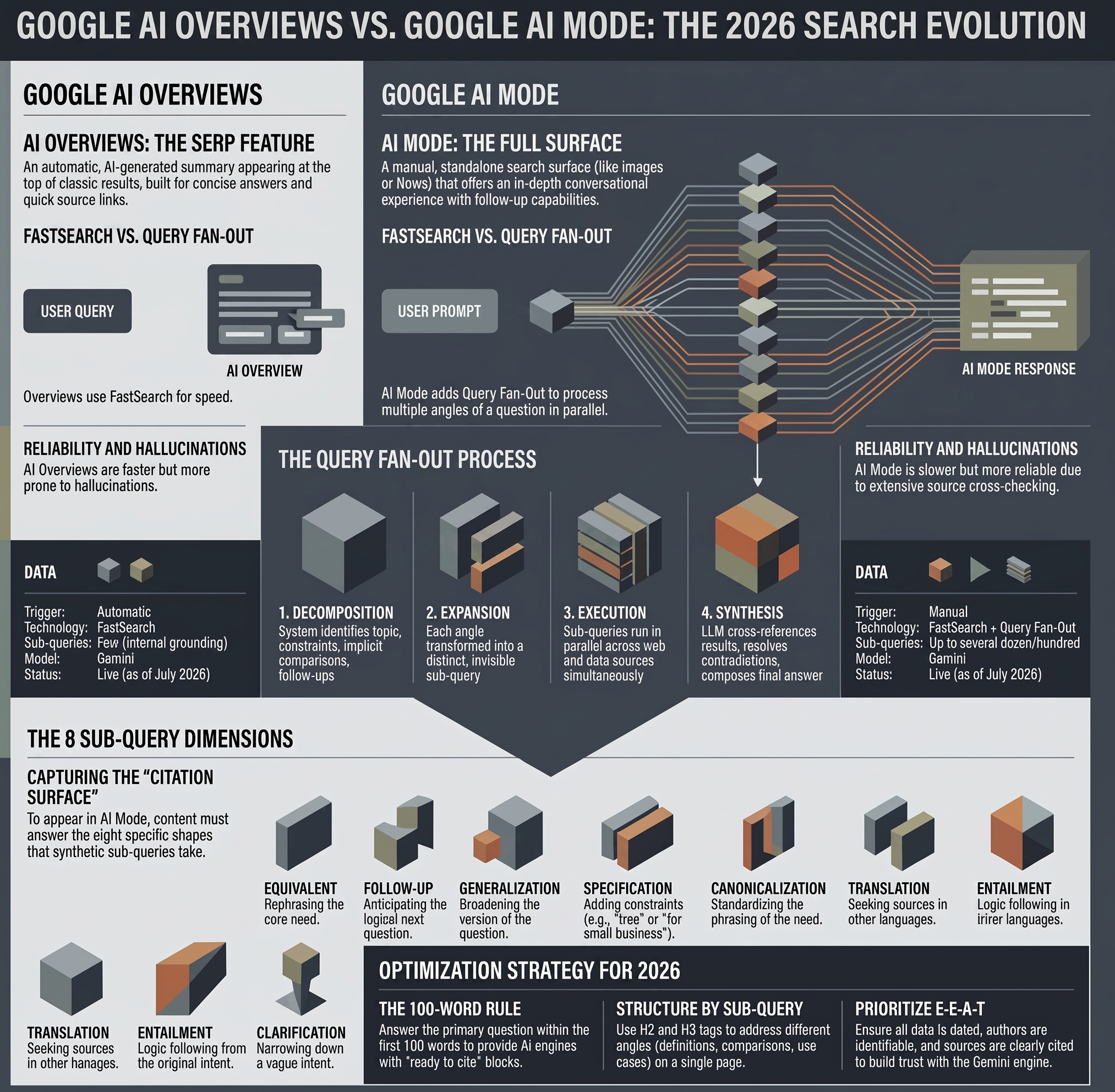
Google AI Overviews is a feature that displays an AI-generated summary at the top of a classic results page, built on FastSearch.
Google AI Mode is a full, standalone conversational search surface that adds Query Fan-Out: breaking a query down into several sub-queries processed in parallel. Both are now live in France as of July 22, 2026. The table below sums up the key differences.
Comparison between AI Overviews VS Google AI Mode
| Criterion | Google AI Overviews | Google AI Mode |
|---|---|---|
| Nature | Feature built into the classic SERP | A full search surface (like “Images” or “News”) |
| Trigger | Automatic, depending on the query | Manual, via a dedicated tab or search bar |
| Technology | FastSearch | FastSearch + Query Fan-Out |
| Sub-queries generated | Few, used internally to ground the answer | Up to several dozen (Deep Search mode pushes into the hundreds) |
| Answer format | Concise summary + a few source links | In-depth conversational answer, with follow-ups possible |
| AI model | Gemini | Gemini |
| Reliability | Faster, more prone to hallucinations | Slower, generally more reliable (cross-checks more sources) |
| Availability in France | Since July 22, 2026 | Since July 22, 2026 |
Google currently runs two AI experiences: Google AI Overviews and Google AI Mode. Both are now live in France, so this is no longer theoretical — it’s worth knowing exactly how each one works.
What is Google AI Overviews?
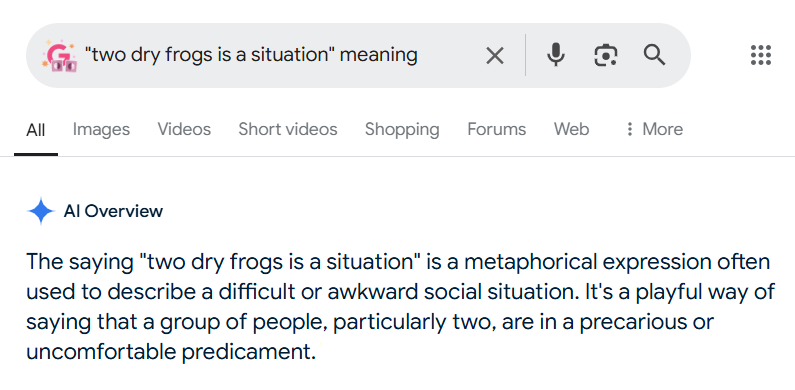
AI Overviews (formerly Search Generative Experience) are AI-generated summaries that appear at the top of a classic results page. They pull information from multiple sources to deliver a quick answer — think of a featured snippet, but more conversational. See also my detailed article on AI Overviews and their impact on impressions and clicks.
What is Google AI Mode?
Google’s AI Mode is a full search surface in its own right, on par with the “Images” or “News” tab. Triggered by the user, it switches to a fully generative experience with conversational follow-ups: the user asks a question, then keeps going with related follow-ups tied to the original query, without starting from scratch.

Where are they available?
Both features are live in France as of July 22, 2026, announced by Elizabeth Reid (VP Search, Google), two months ahead of the deadline Google itself had communicated to publishers. I cover the full timeline, the Search Console toggle to include/exclude your domain, and impact figures from Germany and the US in my dedicated article on the French launch.
How do Google AI Overviews and AI Mode work?
AI Overviews runs on FastSearch: faster retrieval than the classic algorithm, but less reliable, and it structurally consults fewer sources. That’s probably part of why it hallucinates as often as it does. FastSearch is mainly used to ground Google’s LLMs (Gemini), validating their claims and generating AI overviews.
AI Mode adds Query Fan-Out on top, covered in the next section.
What is Query Fan-Out?
Query Fan-Out (sometimes written “query fanout”; internally at Google, “query variant generation” per patent US11663201B2) is the technique that lets AI Mode process several angles of the same question in parallel, instead of answering only the literal query as typed.
Google itself describes it, in the AI Mode announcement, as a technique that fires off multiple related searches in parallel across different subtopics and data sources. One Google engineer compared it to running a dozen searches in the time it takes to run one; Deep Search mode pushes the same logic to several hundred queries to produce a sourced report.
Four steps follow one another:
- Decomposition: the system identifies the main topic, constraints, implicit comparisons, and likely follow-up questions.
- Expansion: each angle becomes a distinct sub-query, invisible to the user.
- Execution: the sub-queries run in parallel across the web and other data sources.
- Synthesis: an LLM cross-references the results, resolves contradictions, and composes the final, sourced answer.
On terminology: no AI provider officially uses the term “query fan-out.” It’s shorthand coined by SEO practitioners (popularized in particular by Mike King at iPullRank) to describe a behavior every AI engine names differently: “query rewriting” at ChatGPT, grounded iteration at Copilot. The underlying mechanism — one question, multiple searches, one synthesis — stays the same.
What are the 8 sub-query types in Query Fan-Out?
Mike King’s (iPullRank) analysis of Google’s patents identified the recurring shapes these synthetic sub-queries take. They show up predictably on AI Mode as much as on ChatGPT or Gemini.
| Sub-query type | What it does | Example for “best GEO tracking tool” |
|---|---|---|
| Equivalent | Rephrasing of the same need | Best AI visibility tracking tool |
| Follow-up | The logical next question | Do these tools also track ChatGPT and Perplexity? |
| Generalization | Broader version of the question | How do you measure your AI visibility |
| Specification | More constrained, more detailed version | Best free GEO tool for a small French business |
| Canonicalization | Standardized phrasing of the need | Recommended AI positioning tracking tool |
| Translation | Version in another language to widen sources | Meilleur outil de tracking GEO |
| Entailment | Question that logically follows from the intent | Do these tools replace Search Console? |
| Clarification | Question generated to narrow down intent | Are you tracking your own brand or your competitors’? |
What this table changes in practice: a page that only covers the literal query structurally misses seven angles out of eight. That’s why a page that answers a keyword literally — without covering comparisons, free alternatives, or scope questions — rarely gets cited on AI Mode, even when it ranks well on the classic SERP.
Query Fan-Out example: a query broken down into sub-queries
Take a query I see regularly in audits: “how do I know if my site shows up in ChatGPT.” Here’s the kind of breakdown to expect:
- Rephrasing: tools to track a site’s visibility in ChatGPT
- Generalization: how to measure your presence in AI answers
- Specification: track an e-commerce site’s ChatGPT visibility for free
- Implicit comparison: ChatGPT vs. Google AI Overviews, where are you more visible?
- Follow-up: what to do if your site never shows up in ChatGPT
- Clarification: are you after the traffic generated, or just the citations?
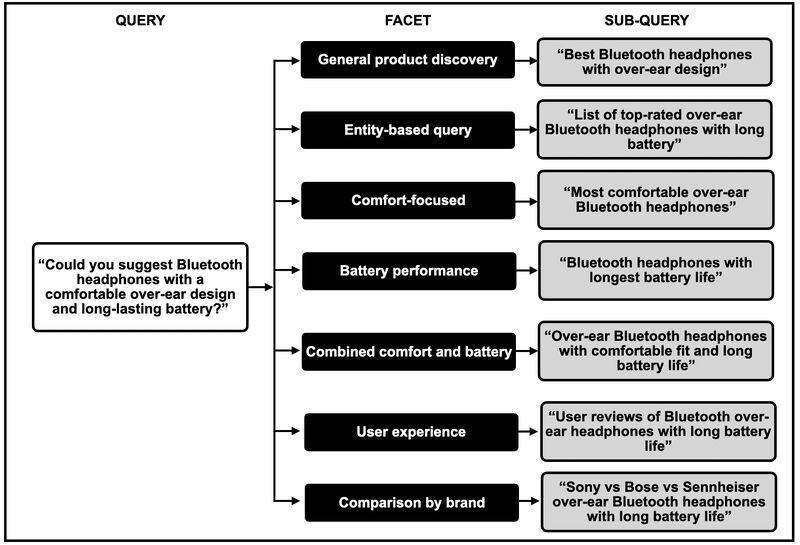
A single page that answers all six angles at once — definition, method, free vs. paid tools, e-commerce use case, corrective actions — mechanically has more citation surface than a page centered on the original query alone. That’s exactly the logic behind my GEO tools comparison.
How do you optimize for Google AI Overviews and Google AI Mode?
- Answer the question within the first 100 words. AI Overviews and AI Mode prioritize citing passages that answer directly, with no editorial detour.
- Structure by sub-query, not by keyword. One H2 or H3 per angle (definition, comparison, free alternative, use case) gives the AI “ready to cite” blocks.
- Cover comparison and specification on the same page. These two angles come up systematically. A comparison table captures both at once.
- Work your E-E-A-T. Cite your sources, date your data, bring in identifiable authors.
- Think in conversational queries. “How does X work” or “what’s the difference between X and Y,” rather than plain dry keywords.
- Don’t bet on a single page for a broad topic. If a topic generates more than 8 distinct high-volume sub-queries, a linked content cluster captures more surface than one page trying to cover everything.
Read my detailed article on how to optimize for Google AI Overviews and AI Mode.
What do Google AI Overviews and Google AI Mode have in common?
Gemini is the shared engine behind both experiences, even though it’s used differently depending on the surface: FastSearch to ground AI Overviews’ short answers, full fan-out for AI Mode’s in-depth answers. And, as of July 22, 2026, both are available in France.
AI Overviews Display VS AI Mode Display
Google AI Overviews show up directly in the classic SERP, but whether they display depends automatically on the query.
Google AI Mode
AI Mode is accessible from the search bar and can be activated by the user at any time.
Google AI Mode is also available on smartphone via an app.
How They Work: AI Overviews VS AI Mode
Google AI Overviews delivers a concise summary of the query, along with a few links to sources (Google is still in testing on this front).
If you want to understand AI Overviews in detail, I have an article that covers the feature in depth, along with its impact on impressions, clicks, and so on.
Google AI Mode takes a more conversational approach: the user asks a question and can then keep going with further questions tied to the original query.
Technology: AI Overviews VS AI Mode
Google AI Overviews Runs on FastSearch
Thanks to the leaks, the Google antitrust case, and Hobo SEO, we know Google uses FastSearch: a technology faster than the classic algorithm for pulling results on a traditional SERP, but less reliable, and by definition, one that consults fewer sources. That’s probably what explains its frequent — and often downright absurd — hallucinations.
FastSearch is mainly used to “ground” Google’s LLMs, like Gemini, to validate their answers and generate AI overviews.
The reason there’s so much buzz and curiosity around Google AI Mode is simple: Google wants to make it the new de facto search solution. And whoever manages to get the best handle on it controls the new SERP.
I won’t get into the details here, but I’m planning a dedicated article on it.
In the meantime, here’s a look at Otterly, one of my favorite Query Fan-Out tools. Whether it actually captures the same sub-queries Google does, though — that I couldn’t tell you.
Google AI Overviews VS Google AI Mode, what users really think !
I find it interesting enough to go and see what they really think about the users HAVE Overviews and AI Mode. So I’ve been getting a ride on Reddit here are a few returns.
Google AI Overviews and Google AI Mode, too redundant ?
On a subreddit, one user questioned the utility of having ‘VE Overviews and AI Mode in parallel. And it doesn’t really wrong. But nothing indicates that these two features will remain in this form for a very long time.
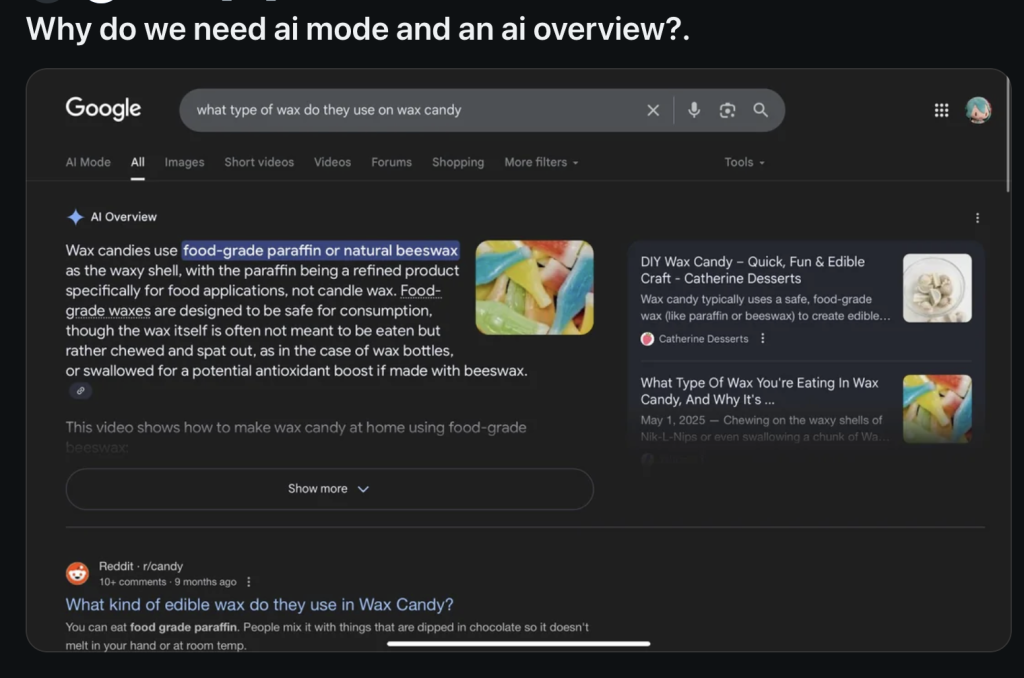
Google is clearly looking for a real breakthrough in the field of AI and seeks above all to maintain, or even strengthen its dominance in the face of OpenAI. For the moment, the usefulness and the question of redundancy seem to pass to the second plan. But one can bet that all of this will eventually become more fluid and better-integrated.
Google AI Overviews and Google AI Mode, what’s the difference ?

Google AI Overviews offers a summary of the results page a classic, while I-Mode provides an experience that is more conversational.

For the basics, read Google AI Overviews: what is it?. For practice: how to optimize for Google AI Overviews.
To track this visibility over time, compare GEO tools: the top 10, free and paid, or choose with the decision guide.
New in AI Mode: the Gemini 4 Argon model. See the SEO and GEO tests of Gemini 4 Argon in AI Mode.
Leave a Reply
You must be logged in to post a comment.