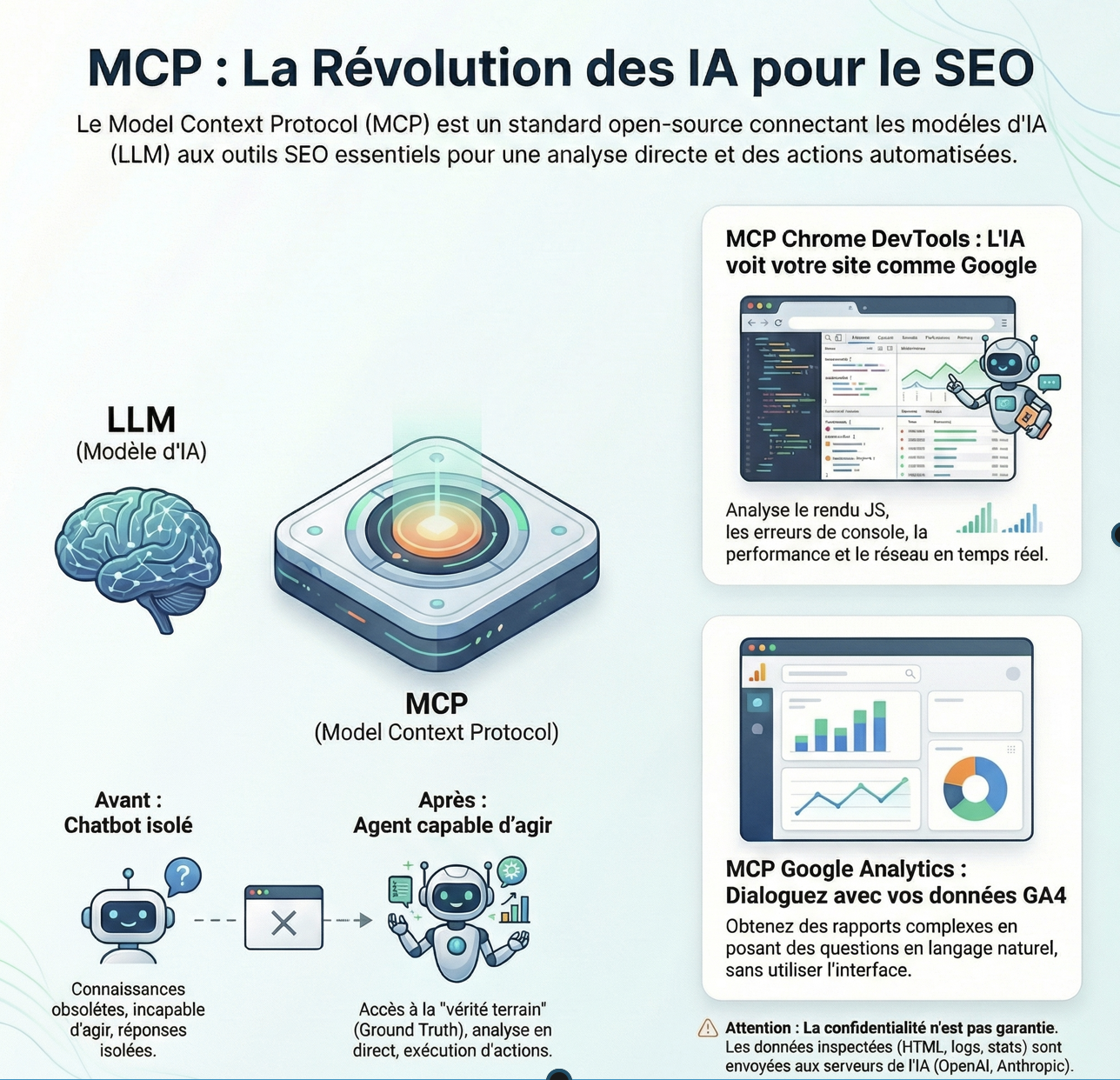
The MCP is a standard open-source (powered by Anthropic, business mother of Claude). A MCP acts as a ‘USB cable’ universal Artificial Intelligence.
It allows you to connect any model of language (LLM) to local data (your files), or remote tools (Google Analytics, Chrome in this case) in a secure manner and standardized.
En what the MCP is revolutionary ?
Prior to the MCP, the AI were isolated in a chat window. With the MCP, they become Agents capable of acting on your infrastructure.
The 3 key points to remember :
Standardization : need More to create a specific integration for each tool. An MCP server works for Claude, Cursor, Windsurfing, and tomorrow, Gemini.
Connection to the Real (Ground Truth) : The AI is not responding only with its ‘training data’ (often outdated), but with your actual data and fresh (Live Data).
Security : It is you (the client) that control what data the AI can see and what actions it can perform. The AI does not ‘scrape’ not random, it uses a protocol that is allowed.
I’m not going to be alarmist, but you will need to install both MCP that I present to you below. Not for looks, but to understand how it works, and especially to improve your everyday life.
Chrome DevTools MCP
As a SEO, GEO Technical, I admit that I’m amazed by this MCP.
Before, the LLMs ‘hallucinaient’ the rendering of a page, or just a curl basic HTML.
With the MCP Chrome Dev Tools, you connect the AI directly to the debugger of Chrome via Puppeteer.
Elsewhere, Dan Petrovic from Dejan.’ve conducted tests in which he explicitly asked ChatGPT to describe what it ‘ saw ‘ on a page. It has been demonstrated that ChatGPT (via OAI-SearchBot) acts as a collector of text (similar to a curl command) that as a browser.
How does the MCP Chrome Dev Tools ?
The MCP Chrome Dev Tools works as follows :
Your AI (in your code editor or terminal) sends a request to the natural language (ex: ‘Check why the site is slow ‘).
The MCP Server translates this in technical orders via the protocol Chrome DevTools Protocol (CDP).
Chrome (headless or visible) performs the action (click, scan the network, takes a screenshot).
The result is returned to the AI that can then analyze the real data (logs, loading time).
PS : personally, I prefer to see the MCP to launch an instance of Chrome.It reminds me of the Google Computer Use Model, which I tested.
In my case, it was not crazy : impossible to pass the Captcha. I surely missed a trick, but the experience was enough for me to see the potential… and the current limitations.
Advantages of the MCP Chrome Dev Tools
Console & Debugging : The AI has access to the logs of the console (Console.logs, errors, JS). She can see the exact error that occurs at runtime.
Inspection DOM : The tool allows the AI to make ‘snapshots’ of the DOM to understand the actual structure of the page after the render JavaScript.
Network (Network) : The AI can monitor HTTP requests, identify the errors, 404 or 500, and analyze the problems of the HORNS, without you having to copy-and-paste the logs.
Scripting : The AI can execute JavaScript directly in the page (evaluate_script) to test patches live.
Real Performance (Core Web Vital pieces) : The AI can initiate traces of performance to measure the LCP (Largest Contentful Paint) and the CLS (Cumulative Layout Shift) in real-time.
Check the output : Ideal to check how Googlebot sees your site (SSR vs CSR). The AI can tell you if the content is loaded in the DOM.
Analysis of the tags are : You can ask the AI to ‘scan all the tags meta and canonical to the current page’ to verify compliance SEO technique instantly.
How to install the MCP Chrome Dev Tools ?
Pre-requisite : Node.js (v20+).
In your config file (MCP for Claude Desktop or Cursor), add this :
Personally, I have it installed on VS code. I the prompt directly and I get the responses in the form of page Markdown. I find it super convenient.
You understood it, it is super convenient.
The case of the use of the MCP Chrome Dev Tools for SEO / GEO
Once connected, here’s what you can ask your Agent (and what it actually uses) :
Audit Rendering JS (Maps_page + evaluate_script)
The Prompt : ‘ Go to this URL, wait until the network is quiet, and fetch me the H1 and Meta Description such that they are rendered in the DOM final. ‘
Interest : Check if your Framework JS (React/Angular) fair SEO client-side. It is the ultimate test of ‘ Renderability ‘.
Audit Core Web Vital pieces (performance_start_trace)
The Prompt : ‘ that Starts a trace of the performance on the Homepage. Parses the JSON result and tell me what script is blocking the Main Thread and will impact the INP. ‘
Power : The AI does not give you just the score Lighthouse. She reads the stack trace and point the file .jscoupable.
Debugging Errors Gifs (get_console_message)
The Prompt : ‘ Walk the tunnel of purchase. Is there any 404 errors, or errors in JS in the console when I click on ‘Add to cart’ ? ‘
The GEO : If the Agent is not able to click because a script crashes, the Search Bot AI will not be able to index the content behind.
Barriers to the installation of the MCP Chrome Dev Tools
I do not hide from you that I galèré to install the MCP.
It is not (yet) the ‘ Plug & Play ‘. To have wiped plasters, here are 3 obstacles that you will encounter :
The Context Token : Chrome DevTools extract the DOM is complete. If you ask Claude to parse a page that is too heavy, you want to explode your window context (and your credits API if you are not unlimited). My advice : Ask the agent to extract selectors specific (ex: document.querySelector(‘main’)) rather than the entire page body.
The ‘Headless’ Blockers : Even with the MCP, some of the sites (Cloudflare, Akamai) may detect that it is a Chrome ‘driven’ and block you. This is not a magic wand for scraper Amazon.
The Python environment/Node : If you have a conflict of versions on your machine (which happens to 99% of devs), the installation via uvx or npx may fail. Make sure you have a clean environment.
MCP Google Analytics MCP
Not gonna lie, the interface of GA4 is a hell UX. We are all in agreement on that. The MCP server allows you to bypass the interface to talk directly to the API Data.
How does the MCP Google Analytics ?
The server is written in Python. It orchestre two libraries official Google that exist for a time, but which were reserved for the developers backend :
google-analytics-data (Data API v1beta) : This is the engine. It is she who will look for the figures.
google-analytics-admin (Admin API v1beta) : This is the configurator. It is used to list the accounts, properties, and check the rights.
The Data Stream (The Pipeline)
Here’s what happens when you ask Claude : ‘ How many visitors yesterday ? ‘
Translation (LLM -> MCP) : the prompt is converted by the client MCP (Claude/Cursor) in a function call, standardised, type :JSON{ 'name': 'run_report', etc.}
Execution (Python Wrapper) : the MCP server receives this JSON. It instantiates the client BetaAnalyticsDataClient of the library google-analytics-data.
Authentication : the script does not ask you for your password. He is looking for the ADC (Application Default Credentials).
API call & Response : Google returns a JSON gross. The MCP server cleans (to get rid of the unnecessary noise) and returns it to the LLM in the form of text or table-structured.
Interpretation : Claude receives the raw data (ex: {'activeUsers': 450}) and form his sentence : ‘ You have had 450 visitors active yesterday. ‘
Chow to install the MCP Google Analytics ?
Pre-requisites : Python 3.10+ and uv or pip.
Authentication : this is where many are going to block. It is necessary to configure the ‘Application Default Credentials’ (ADC) on the Google cloud. (I’m not going to lie to you, it was painful).
Ditto for Google Analytics MCP. I use it on VS Code.
Of course, this is not for everyday wear. But for someone who is managing a lot of accounts on GA4, it is a life saver…
Use of the MCP Google Analytics for SEO
run_report (classic)
The AI builds the request JSON to the API. You can ask : ‘ Give me the 10 pages with the highest level of commitment from the organic traffic in the last month. ‘
The Angle GEO : Identify the content which ‘hang’ really the user, because those are the models that AI is possible in their responses (User Signal).
run_realtime_report
Ideal for monitoring a product launch or a live migration without page refresh Realtime of GA4.
Combine the MCP GA4 and the MCP Chrome DevTools
Theoretically, one can combine the two MCP Analytics, and Chrome DevTools to hang out with insights nice.
Example : Analyze why a specific page doesn’t convert.
J'ai besoin d'une analyse croisée pour la page "https://aioseo.fr/en/top-10-tools-geo-to-track-your-position-ia-2025/" :
1. Utilise le MCP Google Analytics pour me donner le "Taux d'engagement" et le "Temps moyen" sur cette page les 28 derniers jours.
2. Utilise le MCP Chrome DevTools pour visiter cette même page. Fais un screenshot du premier écran (above the fold).
3. Analyse le screenshot : est-ce que le CTA principal est visible sans scroller ? Est-ce qu'une pop-up cache le contenu ?
4. Dis-moi si le problème visuel détecté peut expliquer la métrique GA4.
Crash Test ‘ GEO : is Your website ready for the LLMs ?
The MCP with ChromeDevTools, (Analytics a little less), allow us to make a lot of test GEO / AEO / LLM.
Test accessibility LLMs
Ask your Agent for MCP : ‘ Go on the site, is the cheapest product in the category ‘Shoes’, and tell me if it is in stock. ‘
If the Agent is successful : Your internal mesh and your semantic tags are clear.
If the Agent fails : It will often tell you ‘ I can’t find the button to filter by price ‘ or ‘ The menu is empty ‘. It is exactly this that will live SearchGPT.
Interaction Test JS
Ask : ‘ Click on the button ‘Add to cart’. What is the response from the server (Network tab) ? ‘ a Lot of sites React/Vue.js fail because the event onClick is obscured. If the Agent is not able to click it, it will never be able to finalize an action for the user (the future of search, transactional).
The golden rule : If Claude via MCP can not do it, autonomous agents will not send you qualified traffic.
Recap on the MCP Chrome Dev Tools and MCP Google Analytics for GEO and LLMs
Extraction of reports via the API Data (run_report), reports real-time (run_realtime_report), management of accounts and properties via API Admin.
Identification of the content to its strong commitment to optimizing GEO, monitoring of migration, cross-sectional analysis, visual performance / metrics GA4.
Python 3.10+, uv or pip, setup Application Default Credentials’ (ADC), and project ID for Google Cloud.
Bypasses the interface GA4 complex, allows you to query data in natural language, and to clean the JSON raw for the LLM.
A word about Security of Data
Everything you do to pass an MCP is not confidential.
The results of your queries, the JSON of GA4, the HTML of a page inspected via DevTools, are sent to Anthropic or OpenAI for interpretation.
Therefore, never MCP on the accounts or projects that contain sensitive data or personal (health, identity specific) without anonymize before.
Because yes, the data will pass through the servers of the model.
Curiosity, yes.
Unconsciousness, non.
My Opinion on the MCP Chrome Dev tools and MCP Google Analytics
Google does not gifts. Out of these MCP, they tell us : ‘ Here is the standard to speak to our tools ‘.
The API GA4 to the truth of the figures.
Chrome DevTools for the truth of the rendering.
Install. Play with. This is the best way to understand how the AI can ‘ see ‘ is actually the web. And remember : Good GEO is good infrastructure.
To provide the best experiences, we use technologies like cookies to store and/or access device information. Consenting to these technologies will allow us to process data such as browsing behavior or unique IDs on this site. Not consenting or withdrawing consent, may adversely affect certain features and functions.
Functional
Always active
The technical storage or access is strictly necessary for the legitimate purpose of enabling the use of a specific service explicitly requested by the subscriber or user, or for the sole purpose of carrying out the transmission of a communication over an electronic communications network.
Preferences
The technical storage or access is necessary for the legitimate purpose of storing preferences that are not requested by the subscriber or user.
Statistics
The technical storage or access that is used exclusively for statistical purposes.The technical storage or access that is used exclusively for anonymous statistical purposes. Without a subpoena, voluntary compliance on the part of your Internet Service Provider, or additional records from a third party, information stored or retrieved for this purpose alone cannot usually be used to identify you.
Marketing
The technical storage or access is required to create user profiles to send advertising, or to track the user on a website or across several websites for similar marketing purposes.
Leave a Reply